

Building SEO Since 13 years Old. I didn’t set out to build an agency — I set out to solve a problem.
Are you using the same product descriptions as your competitors or using them across multiple product pages? Could this be hurting your SEO?
Maybe you pulled your copy from the manufacturer's feed only to discover that other stores are using the same text. Or, perhaps you’re using the same descriptions across many indexable pages for product variants. Now someone is warning you that Google could penalize your store for duplicate content, but is that actually true?
We've worked with ecommerce sites in the same dilemma, and we can tell you one thing: there's no automatic penalty for duplicate content, and Google has said so in writing since 2008. However, what these duplicate product descriptions do to your SEO is subtler and can be costly. Google may group together the similar pages, pick one to show, and ignore the rest. Alternatively, multiple indexable pages on your own site may end up battling each other for the same search queries.
So, where should you focus all your time and resources? Should you rewrite everything?
In this guide, we'll show you how you can identify duplicate product descriptions, which ones you should fix, and which ones you should leave as they are.
Let's get started!
Back in September 2008, Susan Moskwa wrote on Google's Webmaster Central blog and explained that there's no automatic duplicate content penalty, at least not in the way most people understand it. The post, Demystifying the "duplicate content penalty", is still published on Google Search Central today, and Google's position on this is still the same.
However, it's important to understand that duplicate content issues affect your SEO and how Google crawls and ranks your product pages. Google's spam policies, last updated in August 2026, target practices such as scraping and scaled content abuse, where large amounts of unoriginal content with little value are published with the intention to manipulate search rankings. A product description from a manufacturer doesn't automatically fall into that category.
John Mueller, Google's Search Advocate, talked about this in a September 2021 SEO Office Hours session and explained that websites aren't penalized just because they use duplicate manufacturer product descriptions. However, he noted that writing unique descriptions is always the best practice.
Canonicalization is Google's word for picking a winner. In its August 2026 post, What is URL Canonicalization, Google describes the process as a way of selecting the representative URL for a piece of content. That is, when Google sees that your site has several URLs with the same descriptions in their content, it groups them together, then chooses one page which it'll consider as the most complete and the most useful, and then marks it as the canonical URL. This is the page Google will show in search results and, in most cases, ignore the rest.
You can also tell Google which URL you'd prefer it to show using a canonical tag. This is a short line of HTML code that sits in the background of your webpage. Customers won't see or click it, but search engines can read it. Here’s an example of a URL with an added canonical tag: <link rel="canonical" href="https://yourstore.com/products/cotton-tshirt">
We had a telehealth client who sold medication in several dosages: 1 mg, 5 mg, 10 mg, 12.5 mg, and 15 mg. Each dosage had its own product page, but the content on the pages was identical apart from the title.
This created several nearly identical URLs, so we considered three ways to address the issue:
Takeaway: When you have several product pages that differ only by a few words, we recommend checking whether they can be consolidated before making separate descriptions or canonical fixes.
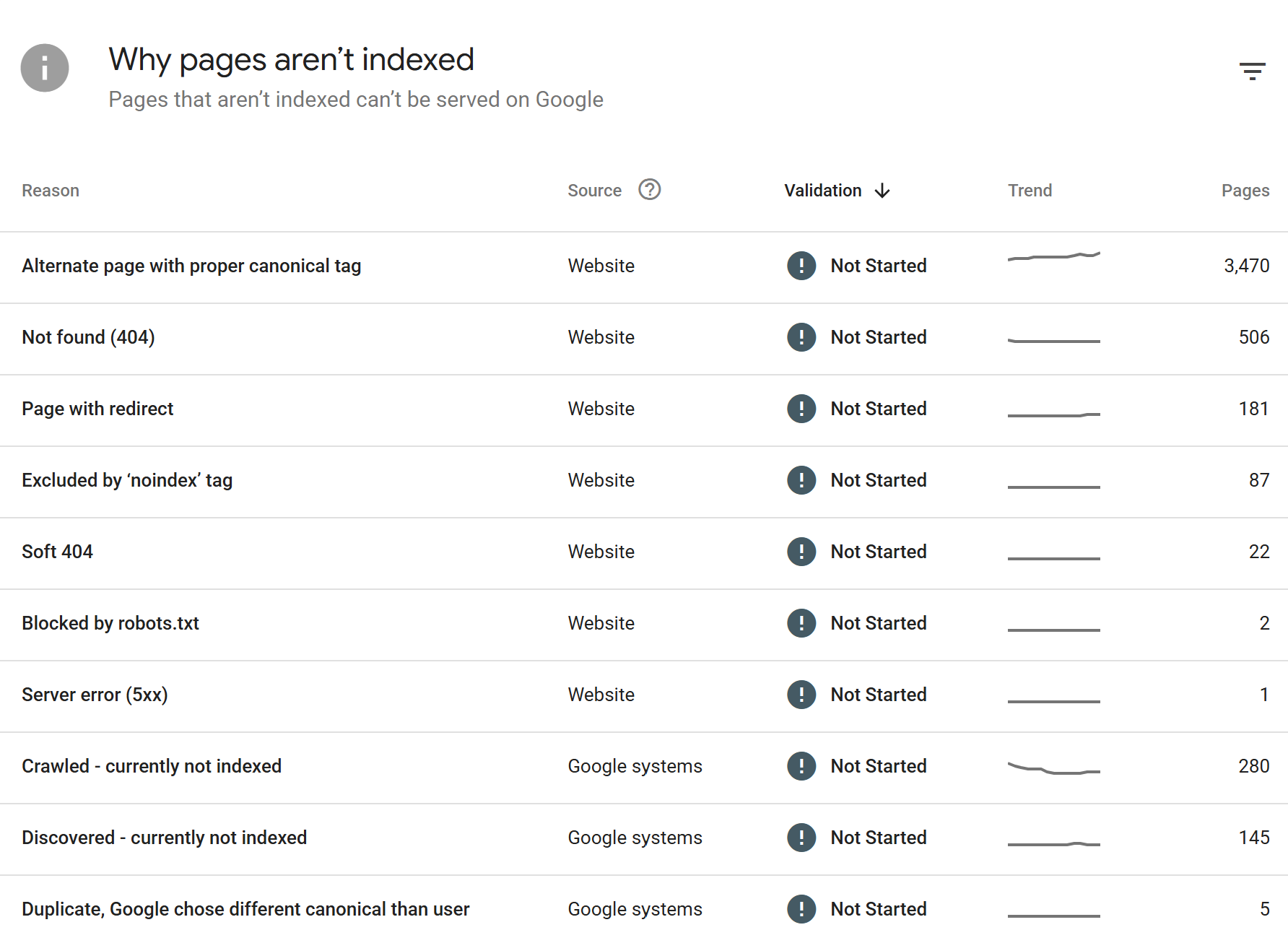
We often help e-commerce stores review their canonical settings. This is a very important part of technical SEO.
If you'd like to check how Google is treating duplicate URLs on your Shopify store, use Google Search Console, and under the Page Indexing report, look for these two statuses:
If Google selected the wrong product URL, it's important that you look further into this. If you'd like expert help, our technical SEO team can investigate this for you and set things right.
According to Google, canonicalization helps to reduce unnecessary crawling activity on websites.
This brings us to another concern, the crawl budget. This is the number of URLs that Googlebot, Google's web crawler, is able to visit and chooses to check on your website within a given period.
Susan Moskwa raised concerns about wasted crawling in 2008, and Google's current guidance still recognizes the issue.
For example, let's say your e-commerce store has 10,000 product URLs, but thousands of them lead to pages that are almost identical. Googlebot may spend time crawling those duplicate URLs instead of discovering newly added or updated products. That's wasted crawl budget for you.
However, this is mainly a concern for very large catalogs or websites that are updated frequently. Google's Optimize Your Crawl Budget documentation explains that most smaller sites don't need to worry about optimizing their crawl budget. And this is still part of technical SEO work.
Now, let's look at the different types of duplicated content on most sites.
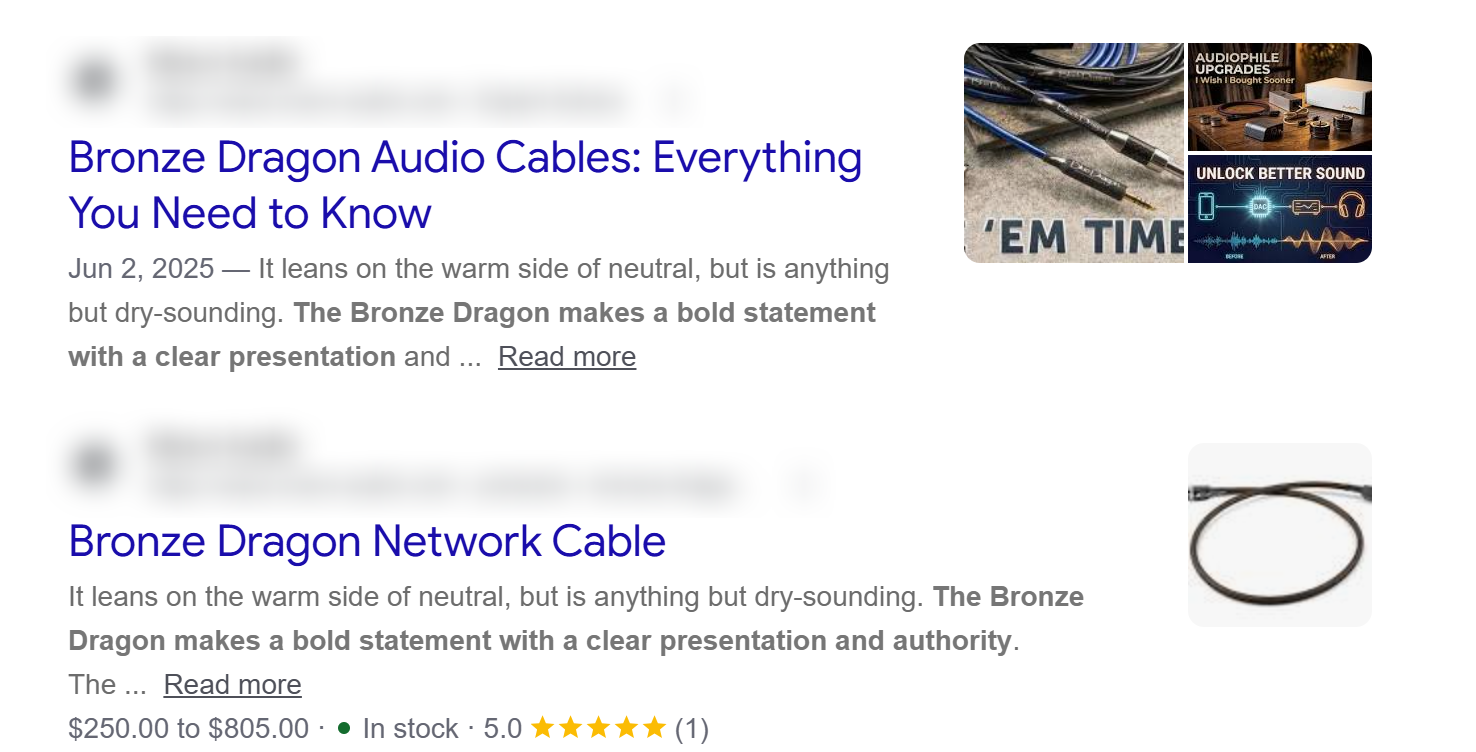
Duplicate content comes in different forms, and we handle each one differently. Review your site to see which one you've got before moving ahead to rewrite.
This is external duplication, where you and several other retailers use the same manufacturer product descriptions that you've copied from the brand.
For instance, imagine you sell a Samsung refrigerator and use the description provided by Samsung. If 100 other stores use the same exact supplier copy, your product page will have little original information to differentiate it from others.
Of course Google won't automatically penalize your store for that. However, it'll be harder for your store to compete with established retailers and with the main manufacturer's website.
Susan Moskwa used the example of Amazon affiliates in her 2008 article. She explained that if a small retailer publishes the same description as Amazon (which is a much more authoritative website), Google has very little reason to consider the small store owner's page as a more useful result.
The solution here isn't to rewrite your entire catalog; instead, it's better that you identify products where you can add meaningful information that shoppers won't find in the manufacturer's standard description.
We'll talk about this in more detail later in this guide.
This is internal duplication that happens when you have different versions of the same product with similar or nearly identical descriptions.
For example, you might be selling the same dress, but with other variants in red, blue, and black on your Shopify store. In this case, since the material, fit, make, and care instructions are the same, you may copy-paste one description for all three colors.
This isn't technically an SEO problem; the issue is how you organize those variants. If you organize the different colors as options on one main product page, you generally don't need to write three different descriptions. However, if you have separate pages for every color or size, you end up with similar descriptions with very little difference in the copy.
And if you have a large catalog of products where each variant has its own page, your site's content will have many similarities.
The third type is boilerplate content. This is information that you repeat across different product descriptions, such as:
This information is identical by design, and is usually harmless. Google's John Mueller, in 2021, explained that repeating a section of text across different product pages isn't the same as duplicating an entire page.
So it's important to review what information you copy-paste across identical pages. For example, if your description has 60 unique words about the product and 200 words about shipping policies, this means that you'll have a higher percentage of duplicated boilerplate content than unique descriptions. To make it worse, customers may struggle to find the information they need.
Even if you have boiler plate information, ensure that you include specific use cases, care instructions, and detailed information if the products are different. The more granular information you have, the more it’s targeted to specific pain points and personas you have on a product page, the better for AI Search.
Another duplicate content issue is when different sites contain the same information. This often happens because (1) you have multiple domains and they have duplicate information or (2) when fake sites try to look like your brand and steal information. If it's a site that has duplicated your information, it's less of an issue but if they're on shopify you can try to contact support to have it taken down and pursue with legal actions.
The important part is who is the original source of the information, and where was the content published first?
Let’s say you have multiple sites for your brand, or you operate across localized TLDs (e.g., .com and .co.uk), and you use identical product copy or blog content across all your sites.
This is when competitors, content scrapers, or phishing/fake storefronts steal your product text, images, branding, and other info to pass themselves off as your business or scrape traffic.
If you discover that another site has stolen your content, there are different ways to take action:
The Takeaway: If another website has copied your content without permission, you don't automatically need to rewrite your own descriptions. Focus on protecting your original content and addressing the copied material instead.
Before you rewrite your product descriptions, you need to know where the duplication exists. Here are three practical ways we recommend for checking your e-commerce store
This one will help you know whether other stores are using the same manufacturer product descriptions as you.
Google may not necessarily show every page that contains the text you show, but this quote search will help you spot copied supplier descriptions.
If you have a large catalog of hundreds or thousands of products, the above manual search might not be practical. Do this instead.
Go to Products, then look for Export in your Shopify admin. Download the CSV file for your products. Open it in a spreadsheet and review the column labeled Description. You can use CTRL+F to spot repeated copy.
Crawl your website using the SEO Spider tool. Under the Content tab, check the Exact Duplicates and Near Duplicates filters to identify pages with identical or very similar content. Note that the default checks on Screaming Frog compare both page content and product descriptions. Review the results before you decide that you need to rewrite a description.
Semrush also flags duplicate content during its technical site crawl.
Run a Site Audit for your website, then open the Issues tab and search for "duplicate content." If Semrush finds duplicate pages, click the issue to see which URLs it identifies.
Keep in mind that Semrush checks similarities across entire pages, not just product descriptions. Review the flagged pages before you decide if you need to rewrite the copy, consolidate pages, or fix a technical issue.
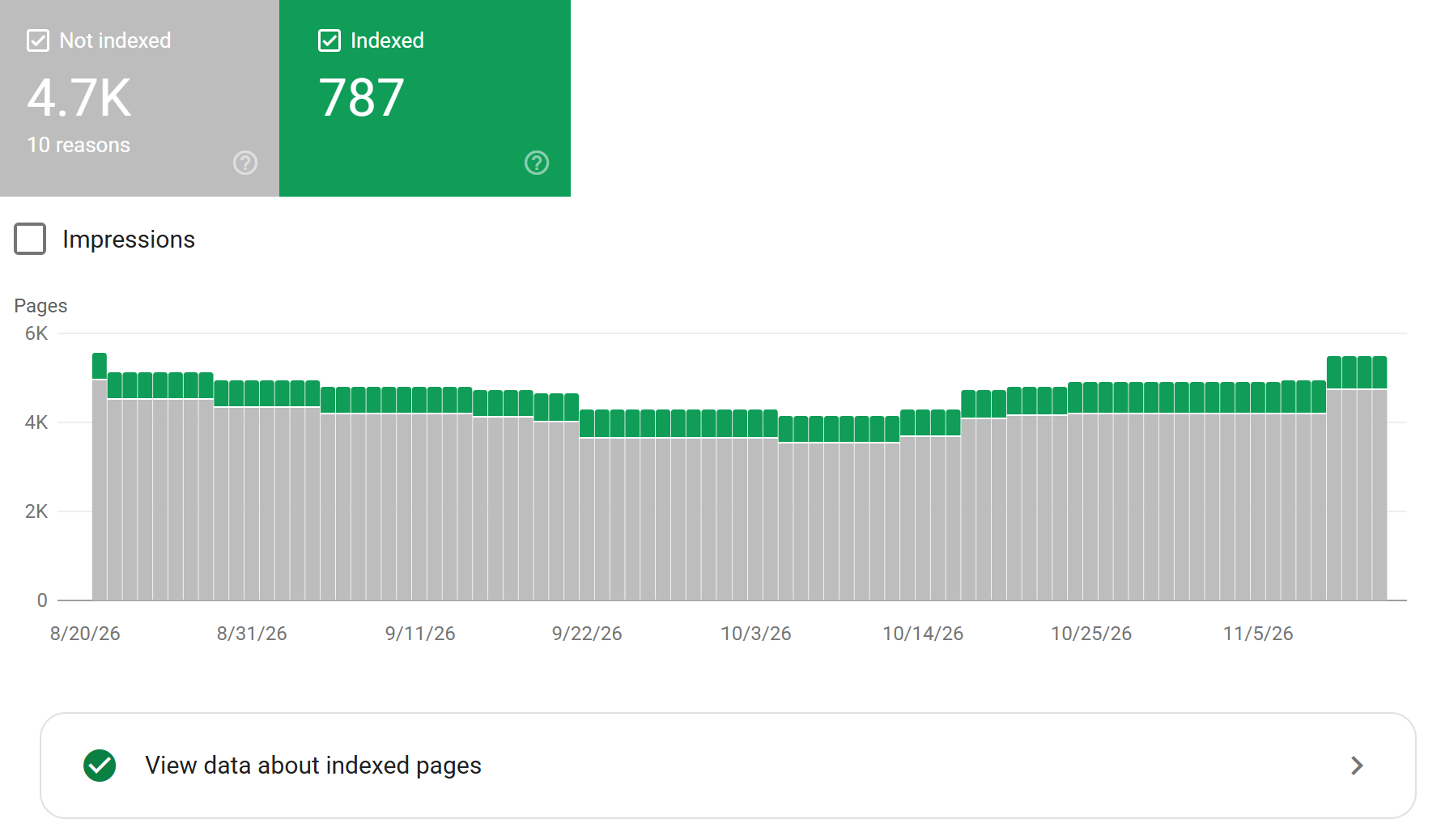
Google Search Console can help you identify duplicate pages that Google has consolidated under another URL.
Now, here's how you'll fix those duplicate content issues.
We recommend that you identify the type of duplication first before you decide on a fix. Through our Shopify SEO services, we help store owners identify duplicate product pages, review technical SEO issues, and determine which descriptions actually need rewriting.
Here's a quick guide to help you decide what to do.
If several stores use the same manufacturer product descriptions, you won't necessarily make your page more useful by simply replacing a few words. Instead, add information that will help your customers.
For instance, you could add information on:
The goal here is to create unique product descriptions that add genuine value. Don't just rewrite the same supplier information using different words.
Google doesn't publish an exact percentage of duplicate content that determines whether a page will rank. However, based on our SEO experience, here's how we'd approach different levels of content overlap.
Note: These percentages are our rough guidelines, not official Google thresholds. Actual SEO outcomes depend on the content of your product pages, search intent, and technical setup.
Add canonical tags to the one URL you consider your most important. Google explains that canonical tags help consolidate ranking signals to one page. However, some variants may not need to share the same canonical URL.
For instance:
Before you consolidate product variants, ask yourself these two questions:
If both answers are yes, go ahead and create a dedicated product page. Canonicalizing it to another page could prevent it from appearing independently in Google Search.
Important: Google advises against using noindex or its URL removal tool as shortcuts for canonicalization. A noindex instruction will prevent a page from being indexed, while the removal tool will temporarily hide URLs from search results.
You don't need to rewrite everything for SEO. Some product information should remain identical because accuracy is more important than originality. This includes:
For example, if a radiator measures 48 by 24 inches, you can't rewrite that, as you need to keep this detail as an accurate attribute even if 1000 other stores also stock it and include the same description.
Let's say you have 4,000 SKUs, but your budget only covers a rewrite of 150 product descriptions this quarter. Where should you start?
We would prioritize products based on their search performance and their potential to bring in revenue. We would also look at any available opportunities to add useful information.
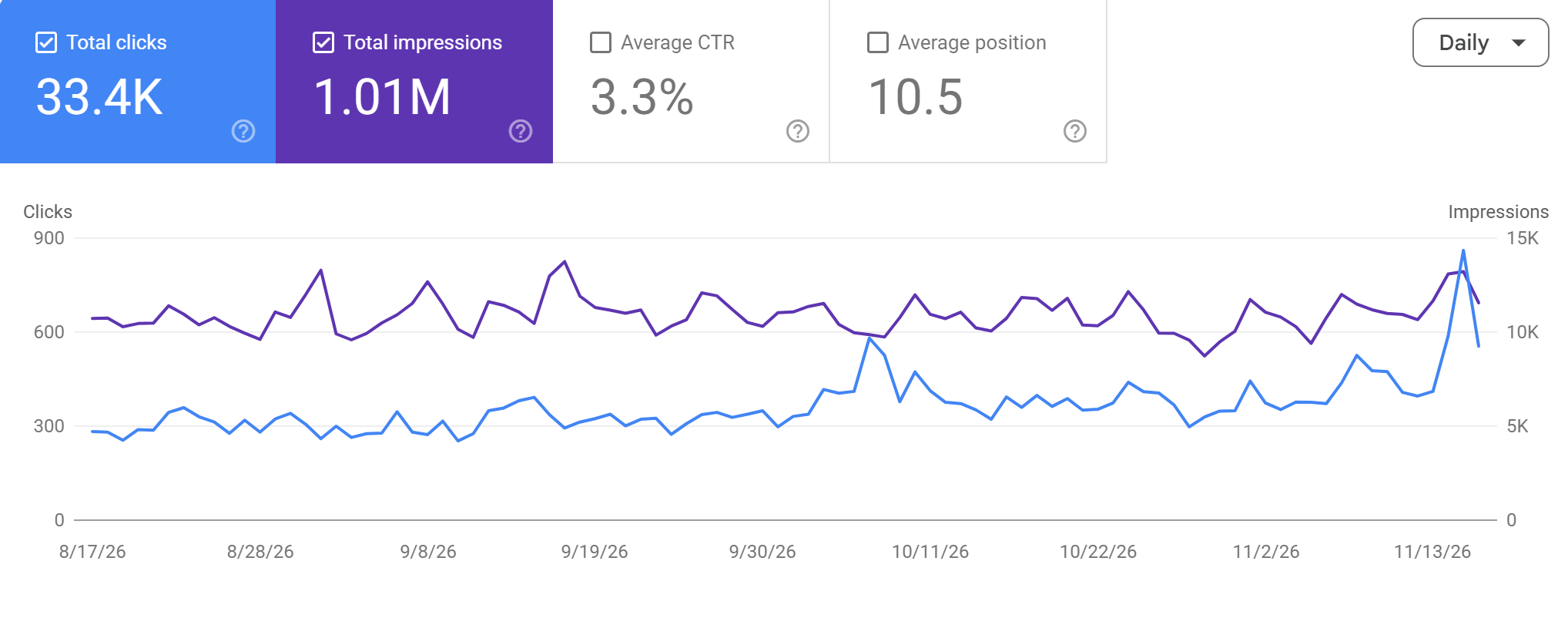
These pages already have some visibility in search results. However, just because they have low clicks doesn't mean their description is the problem.
Look through the search queries, average position, product titles, and search intent before you decide to rewrite.
Next, consider the monthly search volume and profitability of your products.
For example, an accessory that costs $40, with 20 monthly searches and a small profit margin, doesn't justify a long rewrite. On the other hand, a product that costs $600, with 2,000 monthly searches, is different. Always prioritize product descriptions with realistic opportunities to attract organic traffic that's truly valuable.
Ask yourself: What can we tell customers that the manufacturer's description doesn't? Think about your product. Maybe it has a unique feature or a special selling point. Those details can help you create unique content that can answer your customer's questions. If you're simply going to replace words with synonyms, you're not necessarily adding value.
Some SKUs will not attract enough search demand to justify a custom description. For example, one size of a discontinued product may have little chance of ranking on its own. In some cases, it may make more sense to invest in a stronger collection page that targets a broader category keyword.
Yes, but generating thousands of descriptions doesn't automatically make them useful or original.
On February 8, 2023, Danny Sullivan and Chris Nelson published Google's Google Search Guidance About AI-Generated Content. They explained that Google focuses on content quality rather than whether humans or AI produced it.
AI-generated product descriptions are not automatically against Google's guidelines. However, if you publish large amounts of unoriginal content to manipulate rankings, you violate Google's spam policies. For instance, if you generate 4,000 descriptions from one prompt, you swap one duplication problem for a better-written one.
We attended the Google Search Central Live Toronto on April 21, 2026, where Danny Sullivan, Google’s Search Liaison, spoke directly about using AI to write content. Here's more on what he said: Is AI-Generated Content Good for SEO? What Google Revealed.
Not in the sense of a penalty. Google's 2008 post said so, and nothing since has reversed it. Duplicate content hurts you by splitting ranking signals across URLs and leaving Google to decide which page to show.
Use a canonical tag in almost every case where the variant is a size or a color. Give a variant its own page only when the variant term has real search volume and needs a different answer.
Yes. Google will not automatically penalize you. However, if you have the same content as competing retailers, customers have fewer reasons to choose your page. Add unique copy where you can provide useful information that isn't available in the manufacturer's original description.
Yes. For example, support tickets may reveal common questions that may be important to answer on your product page. These details can improve the customer experience and make your content more useful.
Write clear, factual product information, and Google recommends that you follow existing SEO best practices. This includes making important information accessible in text and keeping structured data accurate. There's no guarantee that you'll make AI systems cite your store if you add unique details.
Compare the affected product URLs in Google Search Console before and after making changes. If performance improves, examine whether the changes attracted more relevant visitors. Don't assume that rewriting the descriptions was the only cause. Rankings, seasonality, and competitors can also influence the results.
Duplicate product descriptions won't get you penalized, but that doesn't mean they can't affect your SEO. What they do is hand Google the job of choosing which of your pages is important.
First, identify what you need to fix, then address genuine technical issues, then prioritize rewriting product descriptions based on search demand, profit margins, and opportunities to add useful information.
If you need help from an expert, book a call with us, and we'll review your pages.
