


Building SEO Since 13 years Old. I didn’t set out to build an agency — I set out to solve a problem.
Have you ever tried renaming your product titles, but nothing about your traffic changed?
We see this all the time with Shopify stores, and the cause is usually the same: you've optimized one field while overlooking another. We’ve also seen clients come in with a massive decline in traffic after a redesign. Their product titles were more optimized before, but now they have cool names that don’t make any sense to search engines.
Most advice on SEO-friendly product title best practices treats both the title of the product and its SEO title tag as the same thing, but they're not. They serve different purposes. When you know how to optimize both, you can improve how easily customers find your products.
In this guide, we'll show you how to optimize Shopify product titles and title tags with the right keywords. By the end, you'll be able to write titles that make sense to search engines and shoppers alike.
Let's get started and give your product pages a better chance of ranking.
When you open any product in your Shopify admin, you'll see a Title field at the top, and a separate Page title field under the search engine listing section.
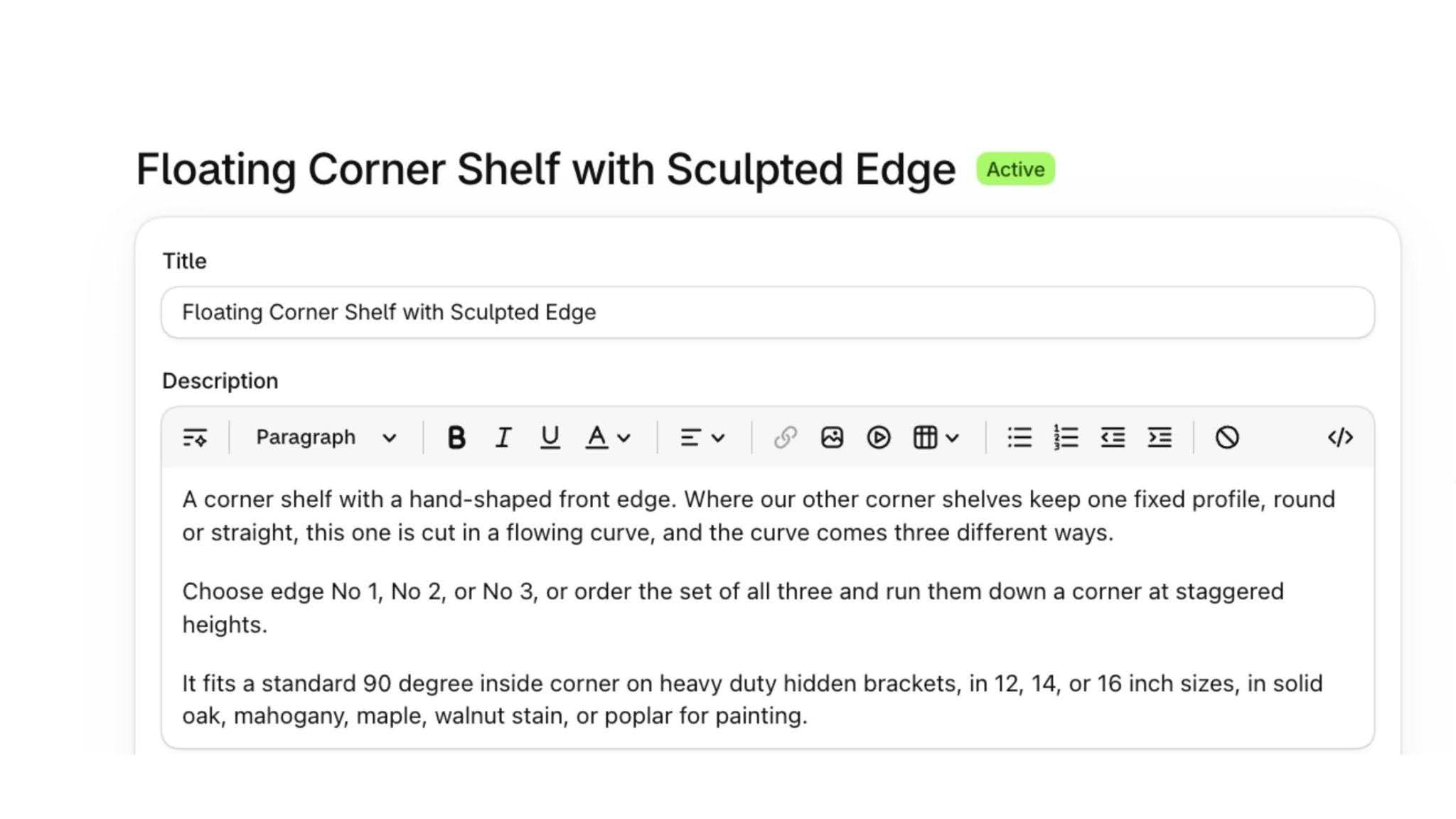
This is the name your customers see.
According to Shopify's Adding and Updating Products documentation, the title you use also generates the H1 heading (the main heading) on your product page. That's why your product title needs to be clear, and it should make sense to shoppers. If customers can't immediately tell what you're selling, you could lose a potential sale. And since the SEO algorithm is also focused on user experience, this is a key part of performance.
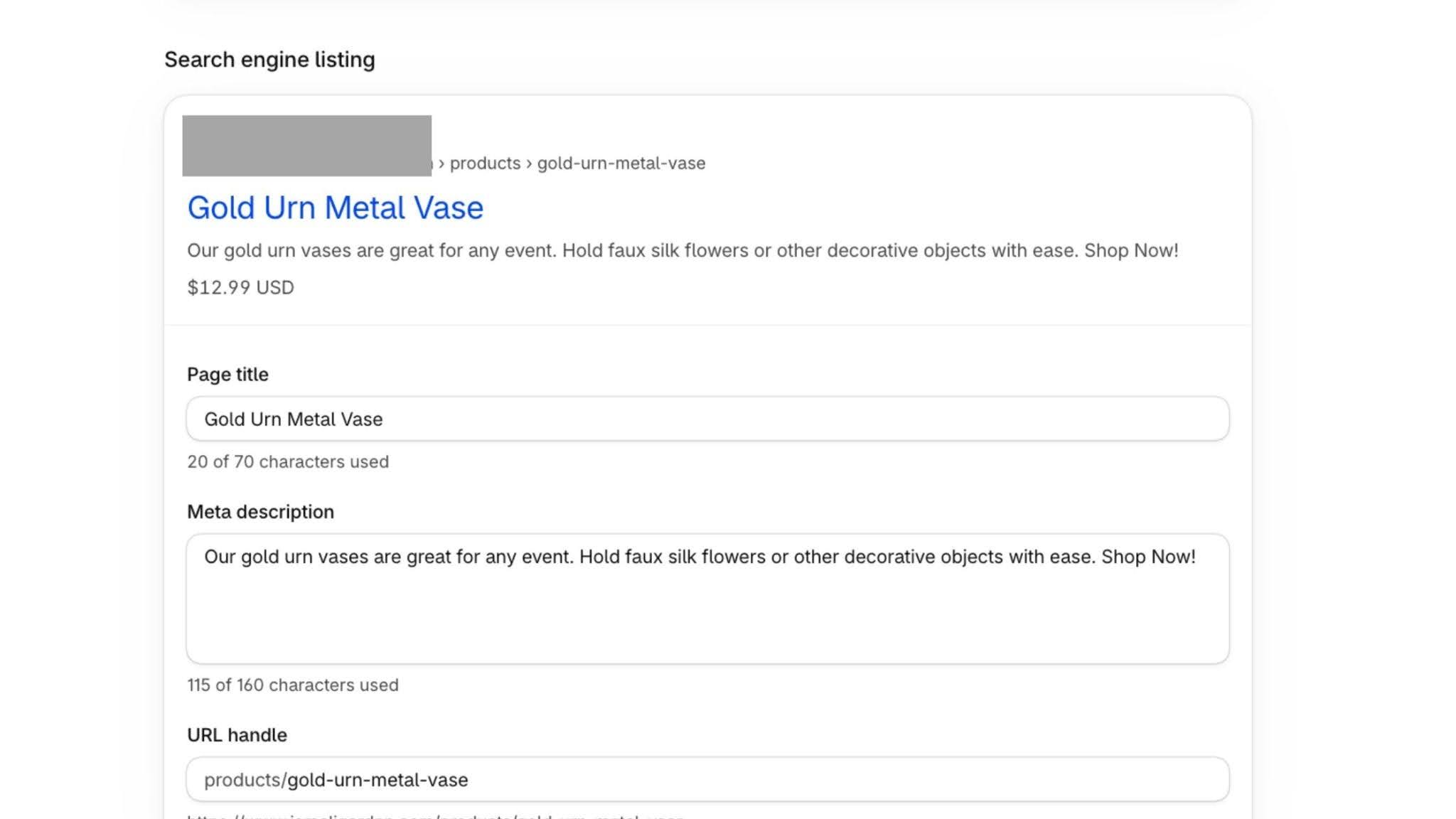
The SEO title tag is the <title> element in your page's HTML. Google reads it and uses it as one of the main sources when generating the clickable headline in search results, known as the title link.
Unlike your product title, the SEO title doesn't appear as a heading on your product page.
If you leave the Page title field empty, Shopify will automatically generate a title tag using your store name and product title. The exact format will depend on your theme. This may work just fine for most of your catalog; however, we recommend overriding the title tag in three cases:
For example, if you have a product with the title, "The Henley," a more descriptive SEO title tag would be "Men's Long Sleeve Henley Shirt." This tag will help Google understand what your product page is about while making it easier for potential customers to recognize your product in search results.
But what about the original product title, "The Henley"? Should you leave it as it is?
Ideally, we always want the product page title, the H1, to be descriptive too. So for the H1, you'd need to describe what the product is about, that is the product type, material, color, model, etc.
And some stores do value the brand more than SEO; they want to have a less descriptive H1.
Of course, a page can rank with a less descriptive H1, but you then have to ensure (1) you optimize the SEO title tag well for the target keywords, (2) add content on the page that's optimized for the keywords, and (3) have other heading tags containing keyword variations so the search engine understands what the page is targeting.
BONUS: We see many stores with technical issues, where a page has too many H1s. This is a common error that confuses the search engine since it makes it more confusing to categorize the page. There should only be one H1 per page, so lacking one or having too many is a quick fix that could have a massive SEO impact.
There is a free Chrome extension called "Detailed" that can be helpful when you want to look at your page's H1, SEO title, etc.
And there’s one more thing to understand about H1 headings and SEO titles: Google doesn't always display your SEO title tag exactly as you've written it. Here's why.

According to Google Search Central's documentation, Influencing Title Links in Google Search, Google uses several sources to generate title links, including:
In an August 2021 Google Search Central article, Google Search Liaison Danny Sullivan explained that Google may generate different title links when the original titles are too long, stuffed with keywords, missing, or repeated across multiple pages.
He also reported that content from HTML title tags is still by far the most likely to be used, more than 80% of the time.
Don't add more keywords. Instead, check whether your SEO title accurately describes your product and matches the main heading (H1) on your product page.
Google may still display a different title link even when you've optimized your SEO title well. Google also notes that changes made to titles can take a few days to a few weeks to appear in search results.
Now that you understand how Google generates title links, let's look at how you can write and optimize your Shopify product titles.
Google and Shopify recommend using clear, descriptive titles with relevant keywords.
At DTC SEO Agency, we apply these principles through our Shopify SEO services, and we've seen our clients improve the visibility of their product pages and attract more relevant organic traffic.
Here are the best practices we recommend for optimizing your Shopify product titles and SEO title tags.
Keyword research for product titles is different from research for a blog post. You're looking for the words customers use to find a specific product, not a topic for an article.
What you want is the main keyword first in the SEO title, then add secondary keywords after.
For the product title, depending on the length and space, you might just want the main/primary keyword, and then secondary keywords can go in H2s across the page.
To find these keywords, check the search reports in your Shopify store, then look at customer support tickets and reviews. These are free resources that will provide valuable insights into the exact words your target audience uses when searching for your products.
Sometimes the terms they’re using could open up an opportunity to create new pages with the exact products you already have but approaching from a different angle.
The best way to know whether that term should be on the current product page or split into a new page that’s optimized for a search variation is to look at the current Search Engine Results Page (SERP).
An example here is the distinction between "bacteriostatic water" and "reconstitution solution". These are two separate keywords, but when you look at the SERP, you can see that the same page can be optimized for both angles.
At DTC SEO Agency, we recommend to NEVER assume in these scenarios; always look at what the data is showing you. There have been cases where a client thinks they have a product page that could be optimized for search variations, but then the data shows us that, in order to rank for both terms, the page can be duplicated and optimized for both terms separately.
Also check the product pages that outrank yours in search results. Look at the keywords they use, not to copy their product titles, but to understand how they describe similar products.
For example, if four competing stores call a product a "Full Spectrum CBD Gummies" while you call it a "Everyday CBD Gummies," you'll need to determine which term better matches the search intent of your customers. What do people actually search in order to find your product?
Long-tail keywords are longer, more specific search phrases that can help your Shopify store attract potential buyers looking for what you sell exactly. In many cases, product pages target more long-tail keywords as their primary keywords since they're granular (focused on specific product details).
In the case of collection pages, people tend to search broader keywords and browse around.
For instance, think about the difference between "sleep gummies" vs "20 mg THC gummies for sleep".
Someone searching the latter knows more specifics about what they want; it aligns well with a specific product page, and optimizing for that keyword will lead to higher conversions if you rank well for it, since it matches a granular search.
Rule of Thumb: While you want to target long-tail keywords in your product pages, don't squeeze every keyword variation into your product title or SEO title tag. Use the most relevant search phrase in your titles, then include additional keywords naturally in your product descriptions, specifications, or collection pages.
After you identify the search terms your target customers use, it's time to use them to create SEO-friendly product titles for your Shopify store.
A Shopify product title is made up of four parts:
The brand is you (the company/brand behind the product), the product name is what you're selling, the key attribute is an important feature of the product (like material or style, etc.), while the variant is a specific product option, e.g., size or color, when relevant.
However, there's no single formula that works for every store. The order should depend on the search intent of your customers and whether they recognize your brand.
The best approach for most Shopify stores is to put your relevant keywords and product details first, rather than leading with the brand name.
Note: For SEO titles, we always want the brand name at the end and primary keywords first.
The product title guidelines in Google Merchant Center recommend that you include the name of the brand in your product feed titles when it's a feature that will set you apart.
Use product attributes in your title when your research reveals that customers search for them or use them to distinguish between similar products. These may include:
Here's how you'll know what to include. Ask yourself: Would a potential buyer search for this detail, or need it to tell your product apart from another? If you answer yes, the attribute probably deserves a place in your title. It'll help shoppers find precisely what they're looking for and identify the right product during online shopping.
Leave out the details that will not help customers identify your product. For instance, internal colorway names, seasonal collection codes, or merchandising terms that only your team understands are irrelevant. Don't add them to your titles.
Google Merchant Center's guidelines also prohibit promotional information, such as prices, sale dates, and shipping offers, in product feed titles. These details belong in their appropriate feed attributes instead.
How long should your Shopify product titles and SEO title tags be?
You'll often see recommendations of 50–60 or 70 characters, but these are not official Google ranking rules. Here's what Google and Shopify actually recommend.
According to Google's Influencing Title Links in Google Search documentation, there's no fixed character limit for an HTML <title> element (that is, the SEO title). However, Google may shorten the title link displayed in search results to fit the width of a user's device.
As previously noted, Google recommends that SEO title tags should be clear, concise, and descriptive.
Shopify, in the documentation Adding Keywords for SEO to Your Shopify Store, states that you can enter up to 70 characters in the Page title field, where you edit your SEO title. However, Shopify recommends that you keep SEO title tags to 60 characters or fewer to reduce the chances of them being cut off in search results.
We recommend that you keep your SEO title tags shorter than 60 characters and don't sacrifice important keywords or product details.
One mistake we often see is SEO title tags that are unnecessarily long, as they get cut off in search results. Use our free SERP Snippet Optimization Tool to preview your SEO title tag and check whether it's likely to be truncated on desktop or mobile devices.
Rule of Thumb: Put your most relevant keywords near the beginning of your SEO title tag so potential customers can identify your product even if Google shortens the title link.
The length of the product title (which appears as your H1), unlike SEO title tags, doesn't have a universal SEO character limit. However, product titles that are excessively long can be difficult to read, especially on mobile devices. You'll find that these product titles may wrap onto multiple lines in the product collections, or they'll appear cluttered in shopping carts, or even get cut off in certain layouts.
Google Merchant Center sets a separate limit of 150 characters for product titles submitted through its product feed. This applies to Google Shopping feed titles, not the product title (H1) displayed on your Shopify store.
Product variants are different versions of the same product in different sizes, colors, or materials, and they can make Shopify SEO tricky, especially when you're managing a large catalog.
If you create separate product pages for every size or color, this can result in duplicate content and make it a lot harder for search engines to identify which page to show in search results.
We recently saw this with a telehealth brand that created a separate page for each mg they sold, so 5, 10, 15, etc. This was flagged as duplicate content since all other aspects were the same. Also, for future work, these pages would start competing against each other since they're targeting the same keyword.
When we looked at what top-ranking competitors did, they either only sold one dose, or they optimized one page for all variants so someone could select dosages on that page.
So here's how to handle product variants without creating unnecessary pages.
When a customer selects a different size or color on your Shopify product page, the URL may change to include a variant parameter, such as ?variant=48219038.
This doesn't automatically mean that you've created a separate product page. In our Shopify SEO audits, we've seen URLs for variants that point back to the main product URL through a canonical tag. This is a tag that tells search engines which version of a page you prefer them to index.
However, these canonical settings can vary, and that will depend on your theme or customizations. This is why optimizing variant titles is different from optimizing separate product pages. It's also a technical SEO decision.
If a variant has meaningful search demand and offers something specific to shoppers, create a separate product page.
Flavor is a good example. For example, if you sell supplements, your keyword research might reveal that customers often search for "chicory root probiotic chews for dogs”. In this case, a dedicated page with its own product title, relevant content, and product images may be worthwhile. However, don't create multiple pages just to target slightly different keywords. Each page should have a clear reason to exist.
Google's Product Variant Structured Data documentation explains how ecommerce websites can identify related product variants using structured data. It supports both single-page and multi-page product-variant setups, with different URL and canonical requirements.
Keep a product option as a variant when it doesn't justify a separate page. This often applies to:
For example, a T-shirt available in small, medium, and large usually doesn't need three separate product pages with almost identical titles and product descriptions.

AI-powered search engines and shopping assistants can use your product titles to understand what you're selling and match your products to relevant searches. That's why clear, descriptive titles are important.
According to the AI Features and Your Website documentation by Google, there are no additional SEO requirements or special optimizations needed for your products to appear in AI Overviews or AI Mode. Instead, Google recommends following existing SEO best practices, like:
We explain these recommendations further in our guide to optimizing for AI search, which is also central to our AI search optimization services.
Clarity here will always win! A shopping assistant may struggle to identify a product from a vague name like "The Weekender."
Compare these two titles:
The second title clearly identifies the type of the product, its capacity, and material. This gives AI shopping systems more useful information when they're matching products to potential buyers.
As such, we recommend that you use descriptive product titles consistently across your online store and shopping channels. Your titles should accurately reflect the products you're selling.
According to Google, you should use a few descriptive terms, but don't repeat keywords unnecessarily because it'll look spammy. Google's 2021 Search Central article also identifies keyword stuffing as one reason it may rewrite title links in search results.
The product title guidelines in Google Merchant Center advise against using capital letters for emphasis, although standard capitalization for abbreviations is acceptable. Don't use promotional phrases like "SALE" or "FREE SHIPPING" in your Google Shopping feed titles. These details belong in their appropriate product feed attributes.
An internal SKU like "BLU-CRW-M-SS24" may be meaningful to your warehouse team, but it won't help potential customers. Keep internal inventory codes in the SKU field. However, you can use model numbers (that are recognizable; that shoppers actually search for) in product titles.
Even experienced merchants make this mistake. They optimize every product title only to end up with long titles that are cluttered across their collection pages on Shopify.
Remember, your Google Shopping feed titles and Shopify product titles don't have to be identical. Optimize each for its purpose, but make sure they accurately describe the same product.
The product title tells online shoppers what you're selling, while the SEO product description explains the key features of the product, its benefits, and other details that can help customers make a purchase. A meta description is different. It's a short summary of your product page that Google may display beneath the clickable title in search engine results.
Make sure all three accurately describe your product and use relevant keywords naturally for effective search engine optimization.
You can use them; however, we recommend that you write unique, SEO-friendly product descriptions, especially for your best-selling products. This is because manufacturer descriptions often appear across multiple ecommerce sites. This makes it harder for your product pages to be unique. It's important to create optimized product descriptions that highlight the specific features of your products and the benefits that can help shoppers make informed buying decisions.
Yes. High-quality product images can improve the shopping experience, and they can help customers understand what they're buying. Use descriptive image file names and meaningful alt text (short descriptions of images) to help search engines understand your product images and support accessibility. This can also help your images appear in relevant image search results.
Yes. You can edit your Shopify product title without changing the URL handle. However, check the URL handle when saving your changes to make sure it stays the same. If you decide to change the URL, create a redirect from the old address to avoid broken links.
Yes, your page can tank/drop in traffic if you change the SEO title or H1 (product title) if Google liked the one that was on there and you were ranking well. So if your performance is strong, ensure you measure any tweaks to your on-page elements.
Ideally, yes, you should give each unique product a title that will help shoppers and search engines differentiate it from similar items.
The best practices for SEO-friendly product titles are grounded in three important takeaways: use relevant keywords, add important product details, and keep your titles clear for both shoppers and search engines.
Now go and review your products with the highest revenue. Check whether their SEO title tags accurately describe what you're selling and match what your potential customers are searching for.
If you need expert help, book a call with us, and we'll help you improve your Shopify store's search visibility and attract more relevant organic traffic.